EmailWish builds eight email flows for your Shopify store and writes the emails, with reviews, pop-ups, chat and a wishlist in the same app. What it costs at your volume, what its reviewers say, and what to check before you switch it on.
EmailWish Review: Shopify Email Automation That Writes the Emails for You
Sponsored: EmailWish paid for this article. They sent us a brief. The prices come from their Shopify App Store listing, the market figures from our own crawl of the App Store, and the judgements are ours.
Most small Shopify stores know they should be sending abandoned-cart and welcome emails. Plenty of them don't, because every flow means writing the emails, designing them and wiring up the trigger. EmailWish's pitch is that you skip all three: you connect your store, and it builds the flows and writes the emails using your products, logo and branding.
It also bundles tools that usually come as separate apps: product reviews, pop-ups and forms, live chat with a chatbot, a wishlist and back-in-stock alerts. Here is what that gets you, what it costs at your volume, and what to check before you switch it on.
Who it is for
A store that has a customer list but no email programme, and nobody whose job is to build one. If you already run Klaviyo with a designer and a dozen tuned flows, the done-for-you part solves a problem you don't have. If you have been meaning to set up abandoned-cart emails for six months, it is aimed squarely at you.
What it sets up for you
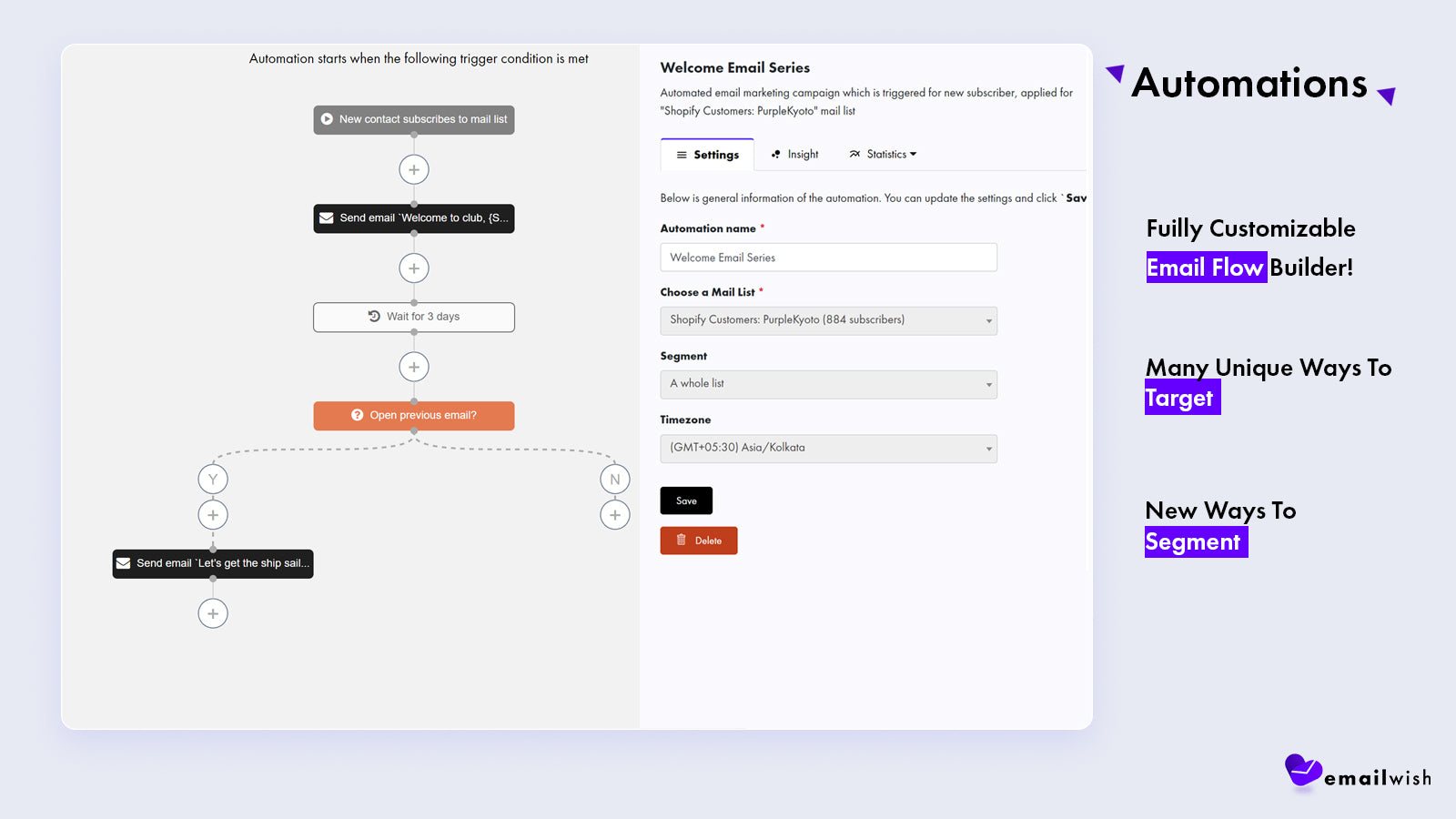
On install, EmailWish builds eight email series for your store: welcome, abandoned cart, review requests, post-review upsells, back in stock, post-purchase upsells, pop-up follow-ups and chat transcripts. You don't write the emails or build the workflows. According to EmailWish, even sign-up is pre-filled: your name, social profiles, email and business address are fetched for you.
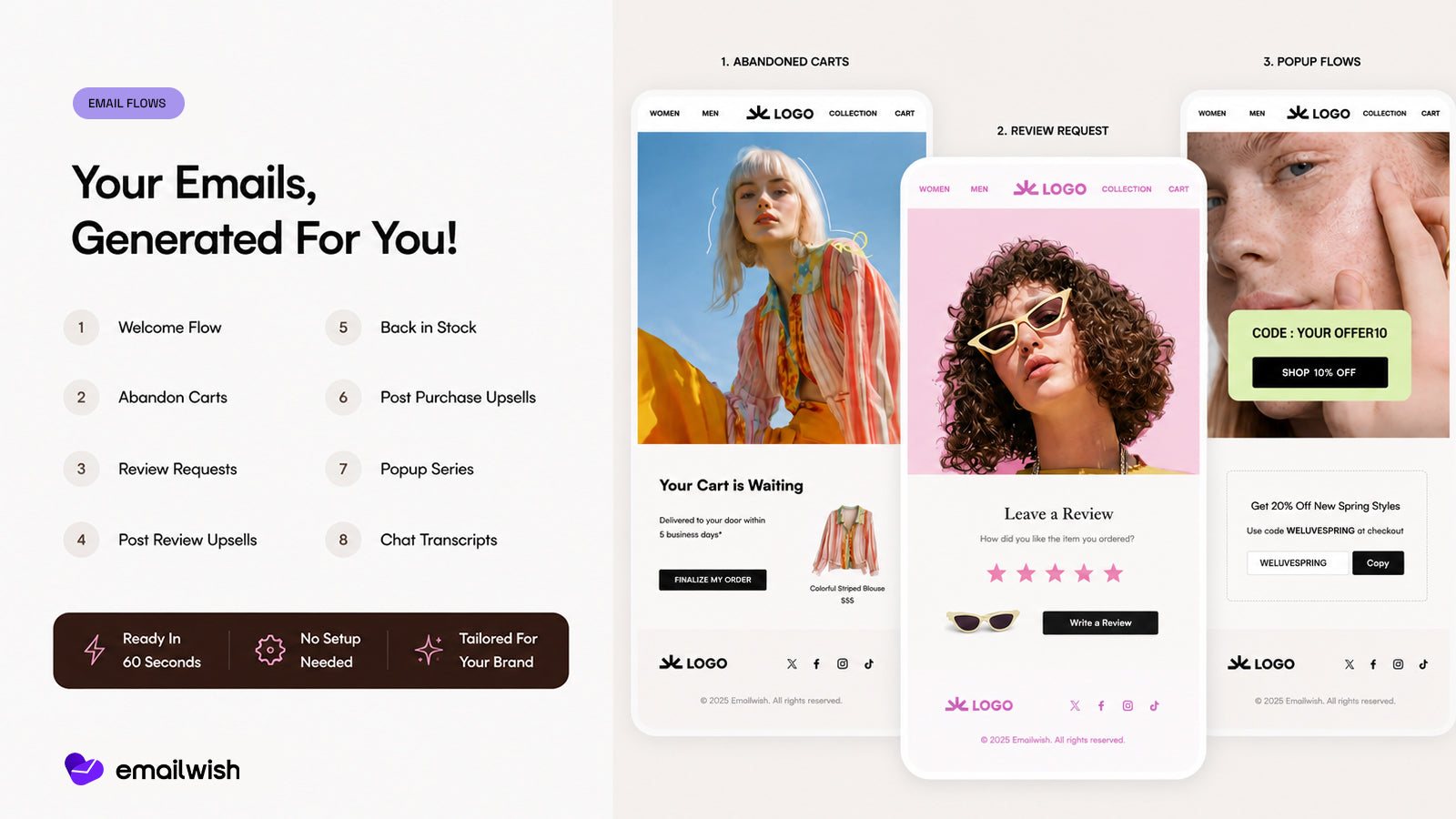
Because reviews, pop-ups, chat and the wishlist live in the same app, they work from the same customer list. Look at the series above: pop-up sign-ups, review requests, back-in-stock alerts and chat transcripts are all email flows, with no second app to connect. The app itself is available in 24 languages.
When you want control back
Done-for-you is only useful if you can take over. Every generated flow opens in a visual builder with triggers, waits, yes/no branches on whether someone opened the previous email, and targeting by list and segment.
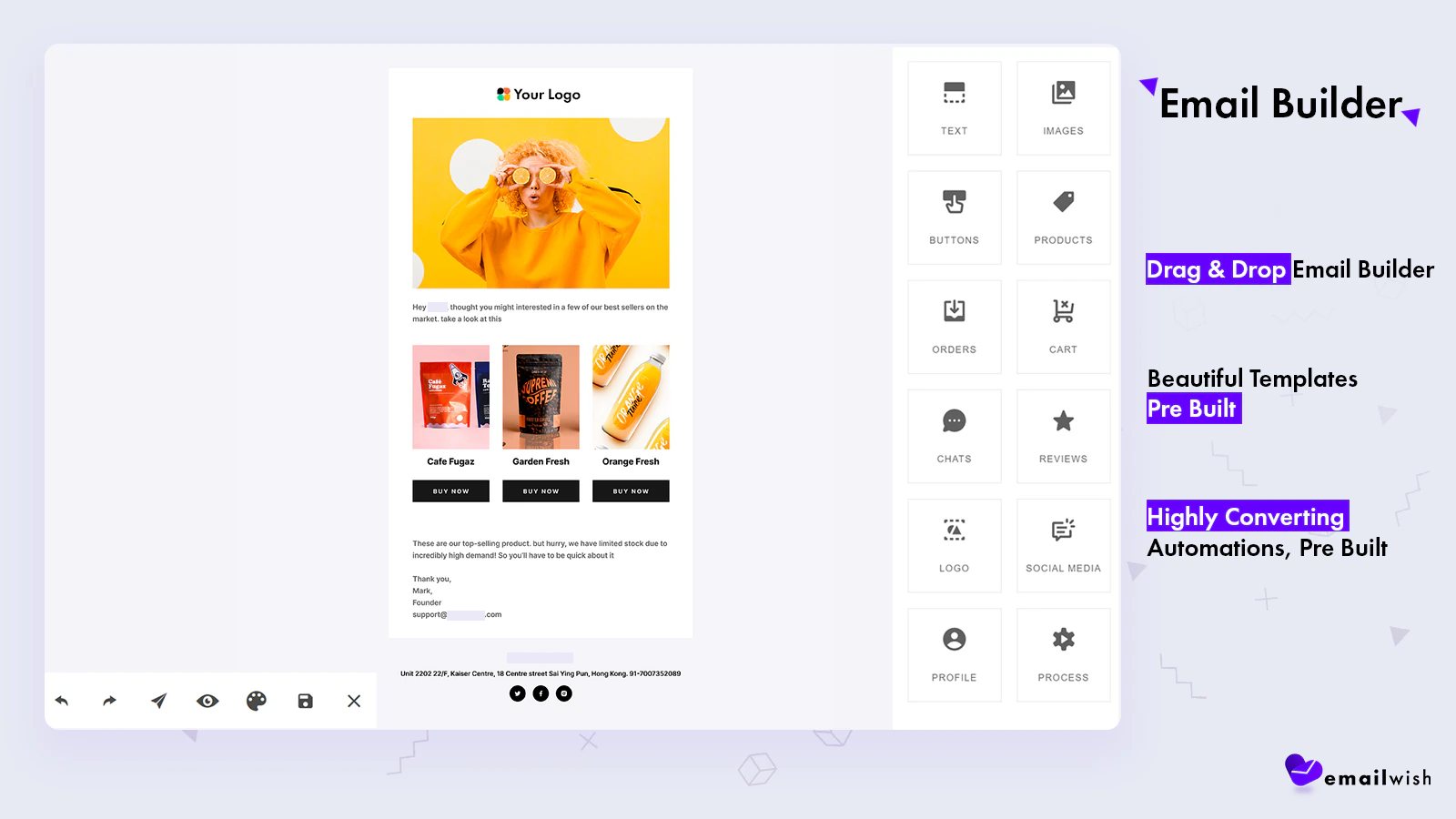
Emails open in a drag-and-drop editor with blocks for text, images, buttons, products, cart contents, orders, reviews and social links.
EmailWish says its targeting options go further than many competitors', Klaviyo included. We have not tested that head to head, so treat it as their claim. What the listing does confirm is segmentation, geolocation targeting and browse-abandonment, price-drop and win-back emails alongside the core flows.
What it costs
There is a free plan with every tool and all eight series. Paid plans are priced by emails sent:
- Beginner, $35/month: includes 10,000 emails, then $2 per 1,000.
- Advanced, $100/month: includes 50,000 emails, then $0.87 per 1,000.
- Enterprise, $1,000/month: includes 480,000 emails, then $0.85 per 1,000.
The overage rates change which plan is cheapest. At $2 per thousand, Beginner costs more than Advanced once you pass 42,500 emails a month. For scale, 2,500 subscribers receiving four campaigns a month is already 10,000 emails, before a single automated flow sends.
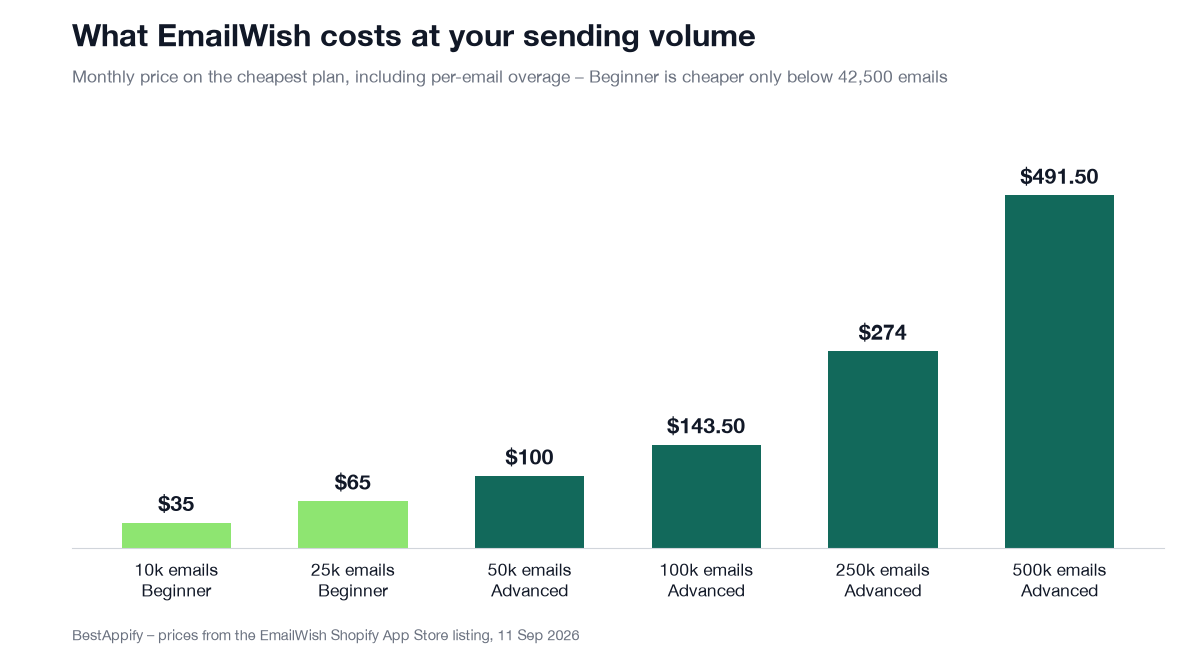
Two things worth knowing before you pick a plan. On sending cost alone, Enterprise is never the cheaper option at any realistic volume: at 500,000 emails a month, Advanced comes to $491.50 against Enterprise's $1,017. If you are considering Enterprise, ask what it includes beyond volume. And the listing does not say how many emails the free plan sends, so check that before you test on it.
What its reviewers say
EmailWish has seven reviews on the App Store, averaging 4.0: five of them 5-star and two 1-star. That is too few for the average to mean much, so it is worth reading the reviews themselves.
The two most recent, both 5-star from August 2026, praise how fast setup is and how quickly support answered. One merchant writes that they replaced Klaviyo and found EmailWish's generated flows more detailed and easier to manage. Both were written within a week of installing, so they speak to onboarding more than to months of sending.
The most detailed review is a 1-star from November 2025. It is worth reading before you install, because it doubles as a setup checklist. EmailWish replied publicly the same day, and we could not verify which of the issues have since been fixed.
Before you switch it on
- Authenticate your own sending domain. The November reviewer's test emails arrived from an EmailWish sending address rather than their store's. Customers who added your address to their safe senders expect mail from it. Set up domain authentication first; one of the August reviewers says support helped them with exactly this, quickly.
- Keep a single SPF record. The same reviewer's mail provider reported SPF broken after the new DNS records went in. A domain can only publish one SPF record, so if you already have one, add the new include to it instead of creating a second.
- Review the flows before they go live. The reviewer found flows active straight after setup. Read each generated email for tone, because done-for-you still means reading it, and pause anything you aren't ready to send.
- Switch off overlapping automations. If Shopify Email or another app already sends abandoned-cart or welcome emails, turn those off, or customers get both.
One app, or one app per job?
The case for EmailWish is that it replaces several apps. Here is where a popular standalone app for each of those jobs starts, from our crawl of the App Store on 10 September 2026.
| Job | Popular standalone app | Reviews | Plans |
|---|---|---|---|
| Product reviews | Judge.me | 46,652 | Free, or $15/mo |
| Pop-ups | Pop Convert | 8,585 | Free, or $15/mo |
| Live chat | Shopify Inbox | 5,493 | Free |
| Back-in-stock alerts | Kbite Back In Stock | 3,917 | Free, or from $5/mo |
| Wishlist | Swym Wishlist Plus | 1,343 | From $29.99/mo |
Most of those jobs have a free option, so the argument for a bundle is not a smaller bill. It is one dashboard, one customer list that every tool reads from, and sign-ups, review requests and stock alerts that run through the same email flows instead of being connected across five apps, each with its own settings to keep in sync.
Verdict
A good fit if you have a customer list and no email programme, want flows running this week, and would rather manage one app than five.
Look elsewhere if you already run a tuned Klaviyo or Omnisend setup, or you want an app with hundreds of reviews behind it before trusting it with your customer list.
You can see how EmailWish's Shopify email automation works on their site, or install it from the EmailWish listing on the Shopify App Store.